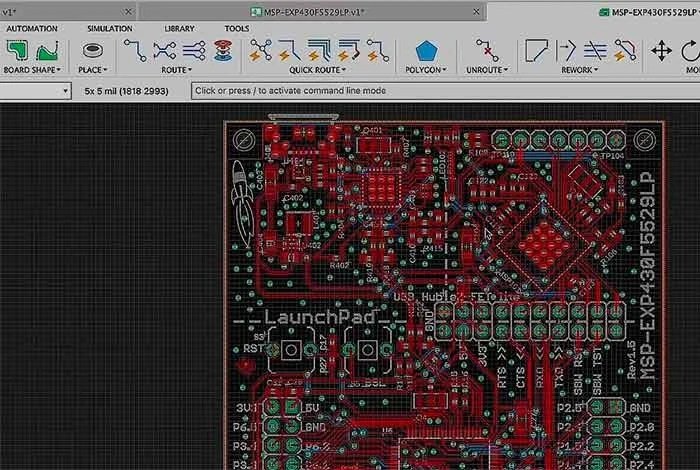
In the intricate world of electronics, bringing an idea from concept to a tangible device hinges on one critical step: circuit board design. This isn't just about drawing lines; it's about orchestrating complex components, signals, and power on a tiny piece of real estate. The right IC Board Design Software & EDA Tools are your indispensable partners, transforming abstract schematics into functional hardware.
But with a vast landscape of options, how do you choose the tool that truly empowers your vision, whether you're a curious beginner or a seasoned professional pushing the boundaries of technology? This guide cuts through the noise, helping you navigate the world of Electronic Design Automation (EDA) with confidence.
At a Glance: Your Quick Guide to EDA Tools
- Beginners: Start with user-friendly, often cloud-based or open-source tools like EasyEDA or Fritzing, focusing on simplicity and learning.
- Intermediate Designers: Look for more robust features, including advanced libraries and some automation, balancing power with ease of use—KiCad and Autodesk Eagle are strong contenders.
- Professionals: Demand high-performance simulation, advanced routing, robust collaboration features, and stringent design verification for complex, mission-critical projects using tools like Altium Designer, Cadence, or Siemens EDA.
- Key Factors: Always evaluate software based on its usability, comprehensive features, pricing model, and the quality of its support ecosystem.
- Trial and Community: Leverage free trials and engage with user communities to truly understand a tool's fit for your specific needs before committing.
Beyond the Blueprint: Why Your Software Choice Shapes Success
Modern electronics are intricate masterpieces. From the smallest wearable device to the most complex server farms, every circuit board is a meticulously engineered ecosystem. Choosing the right IC board design software isn't just a technical decision; it's a strategic one that directly impacts your project's efficiency, accuracy, and ultimate success. The right tool can streamline workflows, minimize errors, and foster innovation, while the wrong one can lead to frustrating roadblocks and costly delays.
Decoding Your Needs: Essential Criteria for IC Board Design Software
Before diving into specific tools, let's establish the fundamental criteria that should guide your selection. These pillars of functionality and support ensure that the software you choose genuinely serves your project and skill level.
Seamless Usability: Getting Started Without the Headache
A simple, intuitive user interface is crucial for faster work, regardless of your experience. Beginners especially benefit from clear navigation and logical workflows that reduce the learning curve.
- User-Friendly Tools: Software like KiCad and LibrePCB offer clean screens and straightforward steps, minimizing confusion and helping you get started quickly. They provide a gentler introduction to the complexities of PCB design.
- Challenges of Steep Learning Curves: Conversely, tools with hard menus or tricky commands, such as some aspects of EAGLE's older interfaces, can slow down learning and deter new users.
- Building Confidence: Helpful tips, tutorials, and readily available community support are invaluable for building user confidence and ensuring you can troubleshoot issues efficiently.
Feature Set That Grows With You: From Basic to Bespoke
The ideal EDA tool should offer features that align perfectly with your skill level and project requirements. What constitutes "essential" varies greatly across the spectrum of users.
- Core Functionality: At a minimum, any respectable board design software will include capabilities for schematic capture, PCB layout, and usually a 3D viewer to visualize the physical board.
- Advanced Needs: As projects become more complex, professional users demand robust support for intricate designs like High-Density Interconnect (HDI) boards, flexible circuits (flex-designs), advanced signal integrity analysis, and multi-board projects. These features are critical for cutting-edge electronics.
- Component Libraries: A comprehensive and well-maintained part library is a non-negotiable feature, saving countless hours in creating custom components and ensuring design accuracy.
Navigating the Price Tag: Free Tools to Enterprise Solutions
Cost is often a significant factor, with options ranging from completely free open-source solutions to enterprise-level subscriptions costing thousands annually. Your budget should align with the features you need and the scale of your projects.
- Free & Accessible: Tools like KiCad and CircuitMaker are entirely free, making them perfect for hobbyists, students, and those exploring the field. EasyEDA offers a robust free plan, with paid tiers starting around $19.9/month for additional features and collaboration.
- Mid-Range Options: Autodesk EAGLE provides a free version with design limits, while paid plans begin around $70/month, offering more capabilities for small to medium projects. DipTrace's starter version is a one-time purchase of $75, with its full professional version priced at $995, offering a balance of features and cost.
- Professional Investment: High-end professional tools like Altium Designer represent a substantial investment, starting around $355/month for a subscription or $11,970 for a perpetual license. These prices reflect the advanced features, extensive support, and rigorous validation capabilities required for complex industrial applications.
Unwavering Support: Your Lifeline in a Complex World
Whether you're new to IC board design or tackling a novel challenge, access to reliable support is paramount. This can come in various forms, from dedicated customer service to vibrant online communities.
- Commercial Support: Professional tools often excel here. Altium Designer, for instance, provides live chat, ticket-based support, and an extensive library of guides and documentation. OrCAD offers 24/7 online help, ensuring assistance is always available.
- Community-Driven Support: Open-source software like KiCad thrives on its active open-source community, with extensive forums and user groups where designers share knowledge, troubleshoot problems, and contribute to ongoing development.
- Hybrid Models: Autodesk EAGLE combines Autodesk's official support channels with a strong, active user group, offering multiple avenues for assistance.
First Steps into the Circuit Board World: Software for Beginners
If you're just dipping your toes into IC board design, the goal is to find software that is forgiving, easy to learn, and provides a clear path to understanding fundamental concepts without overwhelming you.
EasyEDA: Cloud-Powered Design, Simplified
EasyEDA is a fantastic starting point for its accessibility and collaborative features. Being entirely web-based, it requires no installation, allowing you to design on any internet-connected device.
- Key Strengths: Its simple, intuitive interface makes it easy to grasp. It boasts a large and growing part library, covering a wide range of components. EasyEDA supports schematic capture, PCB layout, and even basic circuit simulation, offering a complete entry-level package.
- Collaboration & Learning: Real-time team collaboration is built-in, which is excellent for group projects or learning from others. It includes step-by-step guides and cloud storage, ensuring your work is always accessible and secure.
Fritzing: Visual Learning with a Breadboard View
Fritzing stands out for its unique approach to circuit design, emphasizing a visual, breadboard-centric workflow that mirrors real-world prototyping.
- Visual & Intuitive: This open-source tool features a "breadboard view," allowing you to simulate real circuit connections graphically, making it incredibly easy to understand how components connect physically.
- Educational Focus: It's widely used for teaching electronics due to its visual nature and simplicity.
- Community & Libraries: Fritzing benefits from an active community and a comprehensive part library, ensuring you have access to many common components. It seamlessly offers schematic, PCB, and breadboard views, helping you transition between different representations of your design.
LibrePCB: Clean Interface, Open-Source Freedom
LibrePCB offers a refreshing take on open-source EDA, prioritizing a clean and straightforward user experience.
- Cross-Platform & Simple: Compatible with Windows, macOS, and Linux, LibrePCB is known for its exceptionally clean and simple interface, which helps reduce visual clutter and potential confusion.
- Expandable & Community-Driven: While its part library might be smaller than some commercial offerings, its open-source nature means it allows for feature expansion, and it's backed by a growing, active community that contributes to its development and support.
KiCad: Your Free & Powerful Entry Point
KiCad is often recommended for beginners who are serious about growing their skills, as it offers a comprehensive suite of tools that scales from simple to complex projects.
- Free & Multi-System: As a free, open-source, and multi-system tool, KiCad provides schematic and layout design capabilities for nearly any project type.
- Learning Curve & Support: While its interface can initially seem more complex than EasyEDA or Fritzing, KiCad is supported by extensive guides, tutorials, and active forums. Its robust community provides regular updates, making it a powerful tool that can serve you well beyond the beginner stage.
Building Deeper Circuits: Software for Intermediate Designers
Intermediate users have moved past the basics and are tackling more complex projects—think custom boards for embedded systems, IoT devices, or small-batch manufacturing. They need more features and robust capabilities than beginner tools offer, but may not require the full suite of professional-grade simulation and collaboration tools.
KiCad Revisited: Open-Source Powerhouse for Growing Projects
KiCad's versatility means it's not just for beginners; it's a solid choice for intermediate users as well, particularly given its zero cost.
- Expanded Capabilities: It continues to offer powerful schematic capture, detailed PCB layouts, and 3D viewing, supporting multi-sheet schematics and robust project organization, essential for more involved designs.
- Community & Learning Resources: The active community continuously provides updates and an ever-expanding library of components. Numerous online guides exist to help navigate its powerful features.
- Limitations: While incredibly powerful for an open-source tool, some of its high-speed design tools and advanced simulation capabilities are less robust compared to professional-grade options.
Autodesk Eagle: Bridging Design and the Cloud
Autodesk Eagle has long been a popular choice for intermediate designers, particularly those working on small to medium-sized projects, thanks to its balance of features and user-friendliness.
- Ease of Use & Cloud Integration: It's well-regarded for its intuitive interface, enabling efficient schematic and board layout design. Its cloud features allow for easy project saving and access from anywhere.
- Key Features: Eagle includes a capable autorouter, which can speed up the layout process for less critical designs. Its integration with Fusion 360 is a significant advantage for designers who also work on mechanical enclosures, ensuring seamless collaboration between electrical and mechanical aspects of a product.
- Subscription Model: Operating on a subscription model, Eagle is best suited for projects where its features align with budget and scope. Eagle is a fantastic choice for those transitioning from hobbyist projects to more substantial designs, often discussed in any comprehensive IC board design guide.
DipTrace: User-Friendly Features, Mid-Range Versatility
DipTrace offers a compelling set of features for intermediate users, particularly those seeking a user-friendly experience without the steep price tag of professional tools.
- Intuitive Design Flow: It features easy drag-and-drop tools for schematic capture, PCB layout, and 3D viewing, simplifying the design process.
- Robust Libraries & Checks: DipTrace boasts a large part library, comprehensive design rule checks (DRC) to catch errors early, and some simulation capabilities, enhancing design reliability.
- Cost-Effective with Limits: While less expensive than professional tools, it's generally less suited for very large or complex multilayer boards. Support is available through active forums, fostering a helpful user community.
Proteus: Simulation-Driven Design for Embedded Systems
For intermediate users focused on embedded systems and projects requiring thorough testing, Proteus stands out with its powerful simulation capabilities.
- Simulation Prowess: Proteus is renowned for its strong analog and digital simulation tools, making it an ideal environment for developing and testing embedded systems before committing to hardware. This is especially valuable for educational projects or prototyping.
- Integrated Workflow: It seamlessly integrates schematic design, PCB layout, and comprehensive testing within a visual design space.
- Extensive Libraries: Proteus offers a vast part library, including models for microcontrollers and other complex ICs, which are critical for effective simulation. The full version can be costly, but its simulation capabilities are highly valued for their ability to de-risk designs.
Engineering the Future: Professional-Grade EDA Tools
Professional engineers, large corporations, and specialized design houses rely on advanced IC board design software for projects demanding the highest levels of complexity, performance, reliability, and regulatory compliance. These tools offer robust features for simulation, testing, collaboration, and design verification, critical for high-volume manufacturing and cutting-edge applications.
Altium Designer: The All-in-One Powerhouse
Altium Designer is widely regarded as a comprehensive, all-in-one solution that integrates every stage of the PCB design process.
- Integrated Workflow: It combines schematic editing, PCB layout, and 3D Mechanical CAD (MCAD) tools into a unified environment. This allows for seamless transitions between different design phases and reduces the potential for errors.
- Advanced Visualization & Routing: Designers can work with 2D and 3D board views, enabling interactive component placement and routing that accounts for physical constraints and aesthetics. Its powerful rules engine checks for design errors (e.g., clearance violations, electrical conflicts) in real-time, preventing costly post-design fixes.
- Complex Design Support: Altium Designer excels at handling complex PCBs, including rigid-flex designs, multi-board systems, and high-speed layouts. It integrates robustly with MCAD tools for mechanical enclosure design and utilizes IPC footprints for manufacturing accuracy.
- Collaboration: Cloud collaboration features streamline team projects, allowing multiple engineers to work on different aspects of a design concurrently. Altium Designer is a benchmark for advanced capabilities, a common topic when exploring detailed aspects of IC board design.
Cadence: Orchestrating Complexity with OrCAD and Allegro
Cadence offers a suite of powerful EDA tools, with OrCAD and Allegro catering to different levels of complexity within the professional space.
- OrCAD X: Fast & Intuitive Design with PSpice Simulation: OrCAD X is known for being user-friendly and fast, offering robust tools for schematic capture and PCB layout. It notably includes PSpice for detailed circuit simulation and testing, making it excellent for verifying functionality before physical prototyping.
- Allegro PCB Designer: Enterprise-Level for Demanding Projects: Allegro PCB Designer is tailored for the largest, most complex, and highest-performance designs. It provides advanced capabilities for signal and power integrity analysis, crucial for high-speed digital and RF designs. Both OrCAD and Allegro support multi-board projects, extensive design rule checks, and robust features for team collaboration and version control, enabling the creation of highly reliable board designs for demanding applications across industries.
Siemens EDA (PADS, Mentor Graphics): Precision for High-Reliability
Siemens EDA, encompassing tools like PADS and Mentor Graphics Xpedition, is a dominant force in professional PCB design, particularly for mission-critical and high-reliability projects.
- Complex Layouts & Routing: PADS and Xpedition are designed to handle the most intricate board layouts and routing challenges, including advanced capabilities for high-speed, HDI, and RF designs, alongside comprehensive design checks.
- Cross-Disciplinary Collaboration: Siemens EDA tools facilitate seamless cross-disciplinary team collaboration, reducing errors and saving significant time by ensuring electrical, mechanical, and manufacturing teams are always in sync.
- Industry Focus: These tools are extensively used in critical applications such as automotive, aerospace, and medical devices. They leverage real-time part information and advanced team tools for unmatched efficiency and accuracy. Siemens EDA tools represent the pinnacle of industrial IC board design, often highlighted in thorough guides on the subject.
Ansys: Simulation Master for Performance and Safety
While primarily known for its extensive simulation and analysis capabilities, Ansys plays a critical role in professional IC board design by ensuring performance, reliability, and safety.
- Integrated Simulation: Ansys integrates seamlessly with other design tools, allowing engineers to perform detailed electromagnetic, thermal, and mechanical simulations directly on their PCB designs. This is crucial for identifying and mitigating potential issues related to signal integrity, power delivery, heat dissipation, and structural integrity.
- Enhanced Collaboration & Iteration: Its simulation prowess aids team collaboration by providing objective data for design decisions and facilitating iterative design improvements.
- High-Speed & Safety Critical: Ansys's strong testing capabilities are crucial for developing safe, high-speed, and high-performance board designs, particularly in fields where failure is not an option.
Real-World Applications: Where Professional Tools Shine
Professional software isn't just about bells and whistles; it's about solving real-world engineering challenges across diverse sectors:
- High-Speed Digital Designs: For processors, memory, and data communication where signal integrity is paramount.
- RF/Microwave Applications: For wireless communication, radar, and satellite systems requiring precise impedance control.
- Automotive & Aerospace: For mission-critical control systems, infotainment, and navigation, demanding extreme reliability and environmental resilience.
- Medical Devices: For diagnostic and therapeutic equipment where precision, safety, and regulatory compliance are non-negotiable.
- IoT & Consumer Electronics: For optimizing size, power consumption, and cost in high-volume products.
- Industrial Control: For robust and durable electronics operating in harsh environments.
These tools are essential for handling the most challenging jobs, with their strong testing, collaboration features, and support for intricate designs ensuring innovation without compromise.
Your Blueprint for Selection: How to Choose the Right Tool for You
Selecting the right IC board design software is a significant decision. It's not just about picking the most feature-rich tool, but the one that best aligns with your current needs, future aspirations, and operational context.
Matching Software to Your Ambition: A Needs Assessment
Before you commit, take a moment to honestly assess your requirements. This structured approach will narrow down your options significantly.
- Your Experience Level: Are you a complete novice, a budding enthusiast, or a seasoned engineer? Your comfort with complex interfaces and your need for detailed guidance will dictate the starting point.
- Project Complexity: Are you designing simple breakout boards, single-layer hobby circuits, or intricate multi-layer HDI boards with high-speed signals? The complexity of your typical (and aspirational) projects will directly influence the required feature set.
- Budget Constraints: Are you looking for free open-source options, a one-time purchase, or an ongoing subscription? Factor in not just the software cost, but also potential training, component libraries, and support.
- Specific Features Needed: Do you require robust simulation, integrated MCAD, advanced routing algorithms, signal integrity analysis, or specific manufacturing outputs? Make a list of your non-negotiables.
- Operating System: While many tools are cross-platform, some are OS-specific. Ensure compatibility with your preferred workstation.
- Team Collaboration: If you're working in a team, consider features like version control, cloud-based sharing, and real-time co-design capabilities.
The Unbeatable Combo: Trials, Demos, and Community Wisdom
Once you have a shortlist, the real testing begins. Don't just rely on marketing materials; get hands-on.
- Utilize Free Trials and Demos: Most commercial software offers free trials or demo versions. Take advantage of these to evaluate the user interface, test key features with a sample project, and assess overall performance on your hardware. Does it feel right? Is the workflow intuitive for you?
- Engage with Communities and Forums: For open-source tools like KiCad, immerse yourself in their active communities. For commercial software, check user forums and online groups. These are invaluable resources for learning, troubleshooting, seeking assistance, and getting unbiased opinions from actual users. You'll learn about common pitfalls, workarounds, and advanced tips that documentation might not cover.
- Embrace New Technologies: Keep an eye on emerging trends. New technologies like AI-driven design assistants, enhanced cloud collaboration tools, and advanced manufacturing integration are continually shaping the EDA landscape, offering further enhancements to design processes. Before making a final decision, consult a comprehensive IC board design guide to ensure you've considered all angles.
Forging Ahead: Mastering Your IC Board Design Journey
The journey through IC board design is one of continuous learning and adaptation. The tools we've explored, from the simplest web-based editors to the most sophisticated enterprise solutions, all share a common purpose: to empower you to bring your electronic ideas to life.
Whether you're crafting your first blinking LED circuit or designing the next generation of high-performance computing, remember that the software is merely an extension of your creativity and expertise. Invest time in understanding your chosen tool, leverage its community, and stay curious about new developments. The world of electronics is constantly evolving, and with the right IC Board Design Software & EDA Tools in your arsenal, you're well-equipped to innovate and contribute to that exciting future.